Showing posts with label java. Show all posts

Saturday, January 18, 2014

Application Blocked by security settings (Java error when running applets in Browser)

Application Blocked by security settings


I have upgraded my java and the java plugin in my Chrome browser and then tried to use my webSDR website that includes applets in its content and then got this error above.

All the Google links was referring to adding the webSDR link in
Control Panel > java > Security > Edit site list. (add webSDR url http://zr6aic.giga.co.za:8901/) and  (add webSDR url http://zr6aic.giga.co.za:8902/)

Well,  this did not work for me (the default java control panel java console did not have the security options to add site links)
(I used windows 7 with a Chrome browser) and  the java was update to java 7 update 3 (build 1.7.0_03-b05) when this error above appear. :-(

I had to run the application called "Configure java"

By entering it in my start menu search and then executing the application
Configure java


I then had the application tab option as described above to added the site links.
Click on the Security tab 


Click on the Security tab and add your web url in the edit site list
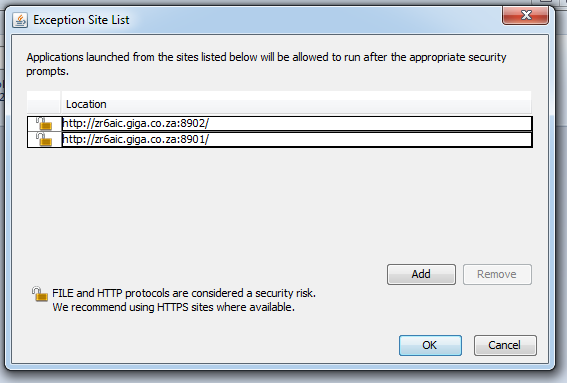


Click on ok and restart you browser  and try the url with java applet.


You will then get another message box "Do you want to run this application?"


Just accept and click run and your website with applet content should now work.

hope this help


Friday, January 18, 2013

Enabling Java for Chromium Web Browser on Linux

Enabling Java for Chromium Web Browser on Linux (for webSDR)

JRE = runtime only you cant compile java only run java
JDK = You can compile and run java
I installed the JDK as I am also a java developer (1.7 latest is fine) jdk-7u11-linux-x64.tar.gz

Change to the directory where you saved the download
Open command terminal
cd /home/anton/Downloads
tar -cvf jdk-7u11-linux-x64.tar.gz

It will unzip all the files creating a directory  similar to this jdk1.7.0_11cd /usr/lib/chromium-browser/plugins
cd jdk1.7.0_11
Need to add the java plugin into the Chromium Web Browser
The path mite be different on your Linux change to fit

cd /usr/lib/chromium-browser/plugins
sudo ln -s /home/anton/Downloads/jdk1.7.0_11/jre/lib/amd64/libnpjp2.so libnpjp2.so

Need to change the System default java to point to new java JDK I know installed above

sudo update-alternatives --install "/usr/bin/java" "java" "/home/anton/Downloads/jdk1.7.0_11/bin/java" 1

Know take you browser to http://zr6aic.giga.co.za:8901  and see if webSDR is know working.

Here is a map of webSDR receivers.

webSDR map